



Please note that the below pertains only to U.S. residents.
We've been receiving many questions from people in the U.S. about prescriptions for our seizure monitoring watch, EpiMonitor. When do I upload the prescription? Who can I get my prescription from? Where do I upload it? What has to be on the prescription? We'd like to clear up the confusion and address all of these questions here. The prescription process is actually quite simple, once you know how it works, and what the necessary criteria is to get the prescription approved.
As you may know, EpiMonitor is an FDA-cleared medical device, which means that for people in the US it's necessary that your doctor (doesn't have to be a neurologist, any healthcare practitioner is fine), who understands your medical history and seizure types, agrees that it's a suitable fit for you.
Should I get the prescription before or after I purchase EpiMonitor?
It’s up to you. You can visit your doctor before or after purchasing EpiMonitor, however, we cannot ship your EpiMonitor watch until your prescription has been uploaded, approved and validated.
If possible, you might want to send this link to the doctor’s office prior to your visit as a reference. You can also show your health practitioner our EpiMonitor page from your cellphone. In fact, the webpage is optimized to fit a small screen, so it’ll look great from your smartphone.
Who can I get my prescription from?
Most of our users have gotten their prescription for EpiMonitor from their usual primary care physician (PCP), neurologist, or nurse practitioner. However, nowadays, it is also possible to find a physician or other healthcare practitioner nearby in your network in just a few clicks on websites like www.zocdoc.com, through your health insurance, or healthcare provider web portals. Some of these alternatives might be helpful if you live far away from your usual healthcare practitioner or if it is difficult to schedule an appointment with them.
What must be on the prescription for it to be considered valid?
Your healthcare practitioner can use our prescription (Rx) template or use their own, standard one.
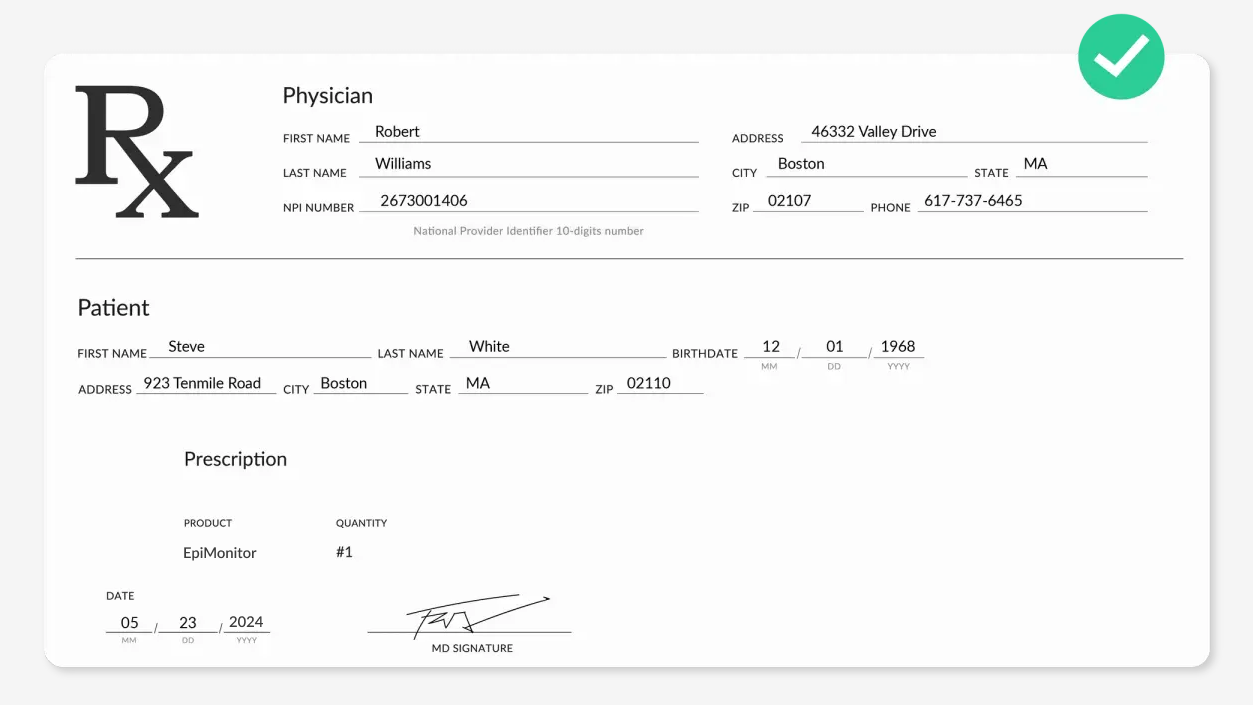
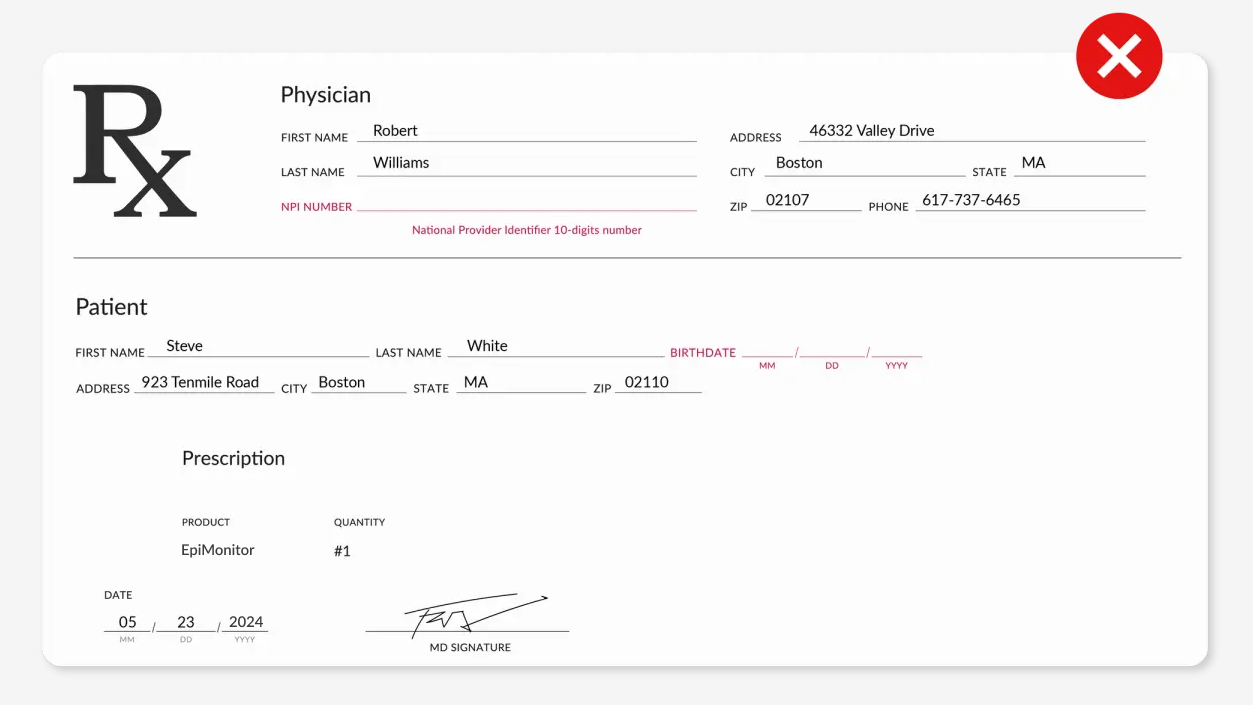
We cannot ship EpiMonitor unless all of the below information is indicated on the prescription. Remember, no field should be left blank:
- National Provider Identifier Number (NPI) of the healthcare practitioner who issued the prescription.
- Full name of the healthcare practitioner.
- Address of the healthcare practitioner.
- EpiMonitor listed as the prescribed item.
- Quantity of EpiMonitor prescribed.
- Patient's full name.
- Patient's date of birth.
- Doctor's signature (digital signatures need to have a time stamp).
- Date of issue.
The NPI number is not substitutable with your doctor's license number or DEA number, so please make sure to ask them specifically for the NPI number. It's a 10-digit unique identifier that all covered health care providers must have.
Here's a correct prescription example:
Here's an example of an invalid prescription. In this example, both doctor's NPI and patient's Date of Birth are missing:
How do I upload the prescription?
If you haven't placed an order yet, you'll have to first take care of this part.
We understand that living with epilepsy can be financially difficult. We have teamed up with some charity organizations in the US who may be able to help you get an EpiMonitor. We have created a tool here that will help you find a local charity near you.
A few minutes after placing the order, you'll receive an email with the link to set up your EpiMonitor Account.
After creating your Empatica account, you can upload your prescription following these steps:
- Log in to your EpiMonitor account.
- On the main page of the account, you’ll see ‘Order frozen’ due to the missing prescription.
- Click on the arrow next to the X icon and then press the 'Add prescription’ button.
- A new window will pop up and you can now upload your prescription by clicking on the ‘Add the prescription’ link.
- Select your prescription file directly from your computer/smartphone or take a picture with your smartphone.
- Review the uploaded prescription and click ‘Next’.
- Fill in the form with the prescription information.
- Click on ‘Upload prescription’ in the bottom right corner.
- If your prescription has been submitted successfully, you should see the message ‘Prescription under review’ when you return to the main page.
Please make sure that the information you enter in the provided fields matches what is on the prescription. For example, if EpiMonitor is intended for someone else, the information you enter should reflect this person, not yourself.
What happens after I upload my prescription?
Within 5 business days, you’ll receive an email from us letting you know whether your prescription has been approved. If so, we’ll proceed with the shipment process and we ship twice a week. You can check your EpiMonitor Account for the status of your shipment. Once EpiMonitor is on its way to you, you'll receive an email with the tracking number.
What do I do if my prescription isn't approved?
If your prescription wasn't approved, we'll email you letting you know why. You can then make the necessary changes and upload it again. If the rejection reason is unclear, our team is here to assist you. Simply email us at support@empatica.com, or give us a call Monday through Friday 9am to 5pm EST at +1 (866) 739-2049.
We hope that now all of your questions around the prescription process have been answered. If you still have any remaining questions or feedback on how to make the process easier to understand, please don't hesitate to reach out.