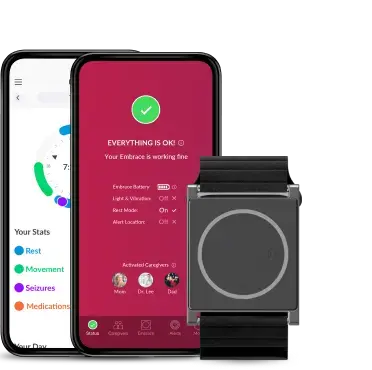



We hope that you’re enjoying your new Embrace2! You may have already gone through the friendly, in-app tutorial that teaches you how Embrace works to keep you covered and provide you and your family with more peace of mind. Perhaps, you’ve even downloaded the Mate App to keep track of your seizures, rest, and physical activity.
As you continue to get familiarized with your new seizure monitoring tool, we’d like to share our top tips for how to get the most out of Embrace2, so you can start having the very best experience from day 1.
Try to wear it as much as possible
Embrace2 is only useful if it's on your wrist, but it's easy to forget it when you leave the house, especially if you're not used to wearing it yet. We recommend trying to wear it as much as possible. It can be especially useful at night when seizures are most likely to go unnoticed because there is less supervision. It's also water-resistant and can be used in the shower, as long as you keep the paired smartphone nearby. Beyond the benefit of seizure coverage, consistent usage also means consistent data collection about your rest and physical activity, which will be stored in the Mate App and could be interesting to share with your doctor.
We recommend that you charge it when there is someone else nearby that could assist in case of a seizure. It might also help to set a reminder on your phone to put it back on after it has fully charged. The good news is that Embrace2 only takes around 1 hour and 30 minutes to charge and will last around 48 hours. So, you only have to charge it once every 2 days. Or, you can charge it for around half an hour, if you only need a full day’s charge.
Keep it charged
Fortunately, charging Embrace is a fairly simple process, and it charges quickly. Embrace2 ships with a charging dock and a USB cable. The charging dock has several dents to maintain constant contact with the electrodes on the bottom of Embrace. One side of the dock has a heart, which must be matched with the heart on Embrace. Once the USB cable has been attached to a power source, you'll see an orange light, which gradually fills the circle. You’ll know when it's fully charged when the circle turns green. If Embrace's battery was fully drained prior to charging, you'll first see a white circle illuminate, and a few seconds later, you'll see the orange light.
Sometimes, Embrace is placed into the charger, but the electrodes and dents are slightly misaligned leading to a loose connection, which could lengthen the total time to charge. To avoid this, adjust Embrace while it’s in the charger until you see the orange light come on. We recommend that Embrace is a on flat surface while charging, and not dangling, as this could shift the electrodes out of place.

Wear it snugly
Embrace should be fastened snugly on the wrist, without any pain or unusual tingling (that would mean you're wearing it too tightly). If it's sliding up and down your wrist or often shifts in position, this means you're wearing it too loose and could lead to more false alarms. To properly tell the time (which you can do with a single tap on the face), the heart must be in the 3 o'clock position.
We recommend wearing Embrace on the wrist that generates the most movement during seizures.
If both arms manifest equal movement during your convulsive seizures, then we recommend wearing it on your non-dominant wrist to reduce false alarms. Therefore, if you're right-handed, your Embrace should be worn on your left hand (and vice versa). This will decrease the occurrence of false alarms, as your dominant hand tends to be the most active.

Choose your caregivers
Your caregivers are the people that will come to your aid when a seizure occurs. It’s important that you have full confidence in them to assist you. You should talk to them in advance about the role and set up a plan for what they should do if a seizure occurs. If you need some inspiration, we have an article about how to help someone during a seizure.

You can add as many caregivers as you like, though the number of activated caregivers will differ depending on your subscription plan of choice. For the Lite and Standard subscription plans, there is only a limit for how many caregivers can be activated at the same time (1 for Lite; 3 for Standard), while for Plus the number of activated caregivers is unlimited, which means everyone you add will receive a call and SMS in case of a possible seizure. Activate caregivers that are nearby and available, so you can be sure that you'll have someone that can quickly come to your assistance. For example, you can activate your roommate as your caregiver when you're at home and deactivate them when you go to work. Then, once you're at work, you can activate one of your nearby colleagues.
To ensure that the call doesn’t go missed, we recommend that your caregivers save the Alert phone number in their phones. Here it is: + 1 (415) 498-1544.
Check the Alert App for useful tips
When you first sign in to the Alert App, you’ll be greeted with a quick tutorial on how Embrace works. We took an animated approach, which is both friendly and educational. However, if you ever need to reference these tips later on, you can find them in the More tab as Useful tips. These quick and friendly guides are easy to follow and will get you mastering Embrace in minutes. Even if you feel like you may know it all, we all have our moments of forgetfulness. But now, you'll know where to go when you see an LED signal you don't remember or if you need help telling the time on Embrace.
If you need additional help beyond the tips, you can easily reach out to us directly through the app. Again, you’ll go to the More tab, tap on Help, and then on contact us on the top right. We’ll get back to you as quickly as possible!

Armed with knowledge (which equates to power, as they say) you’re now ready to confidently make the most of your Embrace!
Words worth reading